League of Legends · Windows companion

One goal in front of you. A cue at the moment it matters.

Clutch reminds you of the thing you're working on while the game is running, can show it in a small in-game overlay, and gives you the evidence afterwards.

Free right now · Windows 10/11 · no sign-in

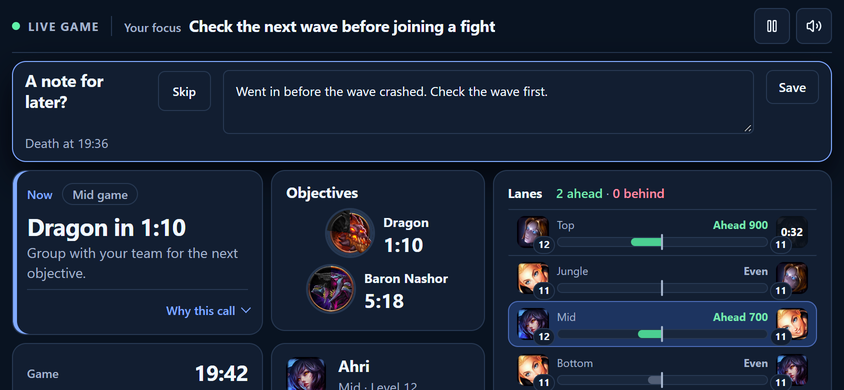
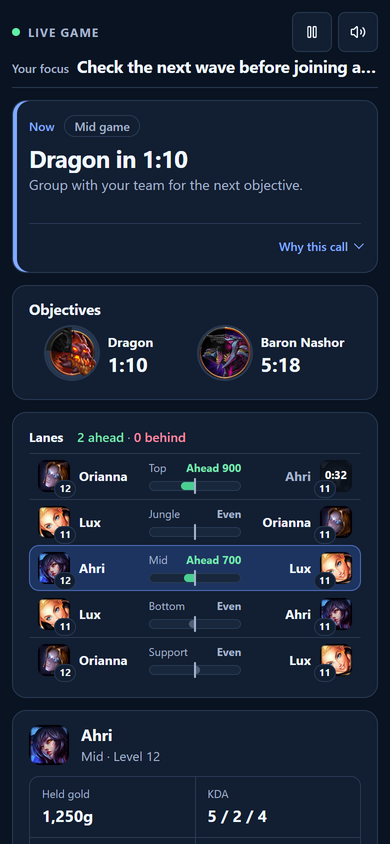
Clutch's live game view: your goal at the top, the current call, lane comparisons, objective timers and your own stats.
The live view during a game: your goal, what is true right now, and the next objective timers. Demo data, illustrative.

Free right now, no card, no ads

Reads League's local game data, read-only

Overlay is opt-in and never takes focus

Replays and voice recordings stay on your PC

How it works

Before, during, after.

Clutch sets itself up the first time you open it. There is nothing to sign in to.

  1. Before you queue· Play

    Pick one goal.

    Write the one thing you're practising, plus an optional lane plan and team plan. In champ select, Clutch can show the picks and bans next to your plan.

  2. While you play· Reminders and overlay

    Get a cue, not an order.

    “Dragon in 70 seconds.” “Holding 1,820 gold.” “Your team is up a player for the next 20 seconds.” Short descriptions of what is true right now. The decision stays yours.

  3. After the game· Review

    Look at the evidence.

    Your timeline, your deaths, what you were holding when you died. Facts first, with your own notes and self-score kept separate.

Reminders

A short cue at the moment it matters.

Most advice arrives when you can't act on it: in a video, or on a scoreboard after the fact. Clutch's reminders come from one scheduler while the situation can still change, and they are off until you turn them on.

  • Your goal
  • Objective timers
  • Gold you're holding
  • Numbers advantage
  • Death notes, typed or spoken

Honest caveat: some cues are estimates. Wave timing and early objective leads are calculated, not detected. Each cue type can be switched off on its own, and Settings shows how each one has landed for you.

Clutch's Play screen before a game: a goal with a lane plan and a target, a Turn on reminders prompt, and recent matchups.

Play before a game: your goal, your lane plan, and one switch for reminders. Demo data.

In-game overlay

Glanceable, and out of the way.

An opt-in card on top of the game. It shows the next objective timer, your goal, a hint with the raw gold number, and bars comparing teams and lanes. It never takes keyboard focus and never sends input to League. Edit mode (Ctrl+Alt+O) lets you move it.

The overlay is built for Borderless windowed League. How it behaves in real games is still being tested. Images are composited over an illustrative backdrop with demo values; the map inset is from Riot's Data Dragon.

Review

Review the game, not just the score.

Each game shows what you meant to do and how it went: cumulative CS and gold with your deaths and the objectives marked, your lane against your lane opponent, and what you were holding when each death happened. Add a self-score if you want one; a missing score is never a failure.

Event order does not establish a cause.

That's the caption Clutch puts on the minutes after a death. It also lists the reminders it held back, with the reason.

Clutch's Review screen: win and loss totals, farming, gold and kill participation, then a list of games with the goal each was played against and its self-score.

Review: every game next to the goal you set for it. Demo data.

Progress

Compared with your own games.

Comparisons come from your own games, with the sample size printed next to the number. Each week Clutch offers a strength, a recurring risk and one small thing to try, each with its coverage and a “low confidence” label when that is the honest answer.

Missing games stay missing. They are never counted as zero.

Clutch's Progress screen: the last seven days, a recurring risk with its sample size, and a suggested next experiment.

Progress: a risk and an experiment, with the sample sizes shown. Demo data.

Boundaries

What Clutch won't do.

A free app that reads your game should say exactly what it doesn't touch. This is the list.

Where your data lives

Where each kind of data goes.

On your device only

Your goals, plans, death notes, self-scores and preferences. Replays and voice recordings. The local match recorder's database. Nothing here is uploaded.

From Riot, through our service

Match summaries and timelines you import, taken from Riot's public match data. Clutch picks up your Riot ID from your first League game, or you can enter it in Settings. It is not verified.

Anonymous usage data

Clutch sends anonymous usage data tied to a random install id: which screens and features are used. It contains no Riot ID, name or PUUID, no other players' names, and never opponent vision. Nothing is sent during a live game. Settings has a switch that turns it off and asks for the data to be erased.

Requirements

What you need.

Windows
10 or 11, 64-bit
League
running while you play
Sign-in
none; no account to create
Connection
required for match import and Riot lookups; there is no offline mode

Build status

Beta build

Version
—
Published
—
Size
—
SHA-256
—

The first beta build is being prepared. When it's ready, this page carries its version, date and checksum.

Questions

The ones people actually ask.

Is this allowed? Will it get me banned?

Clutch never reads the game's memory and never sends input to the League client. While a match is running it reads Riot's own local, read-only data — the same game client API — and it never automates anything in the game. There's no “Riot-approved” sticker on this page, because that isn't ours to claim; what we can tell you is precisely what the app does and doesn't touch.

Do I need to sign in or give you my Riot password?

No. There is no sign-in and no password field anywhere in the product, and Clutch never sees your Riot credentials. It sets itself up silently the first time it runs. Your Riot ID is picked up from your first League game, or you can enter it in Settings; it isn't verified.

What exactly gets uploaded?

Your goals, plans, notes, self-scores and preferences stay on your device. Replays and voice recordings stay on your device. Match summaries you import come from Riot's public match data through our service. Clutch also sends anonymous usage data under a random install id, with no Riot ID, name or PUUID and no other players' names; you can switch that off in Settings. The Privacy section above has the full split.

Does it change my game, my settings or my FPS?

It doesn't touch your graphics settings, doesn't inject input and doesn't need admin rights. The overlay is opt-in, never takes focus, and never sends input to League. We won't quote you an FPS number: performance in real games is still being measured, and an unmeasured number doesn't belong on this page.

Why is it free?

Because it's early. No card, no ads, no data sold. Treat it like an early build: expect rough edges and changes.

Can I take my data with me, or delete it?

Your goals, notes and preferences are stored on your device, so uninstalling Clutch and removing its data folder removes them. A one-click export and delete aren't built yet. The usage-data switch in Settings clears the queued data and asks for server-side erasure. We'd rather say that than promise a button that doesn't exist.

Try it on your next game.

Set one goal, get the cue, review what happened.

Free right now · Windows 10/11 · no sign-in